Introduction
Keeping track of everyday belongings has become more complicated as people carry more devices, travel frequently, work from different locations, and move between home, office, school, airports, and public spaces. Keys can disappear into a sofa, a wallet can be left in a restaurant, and luggage can become difficult to locate in a crowded airport. Bluetooth item trackers are designed to provide a practical way to locate these belongings when they are misplaced.
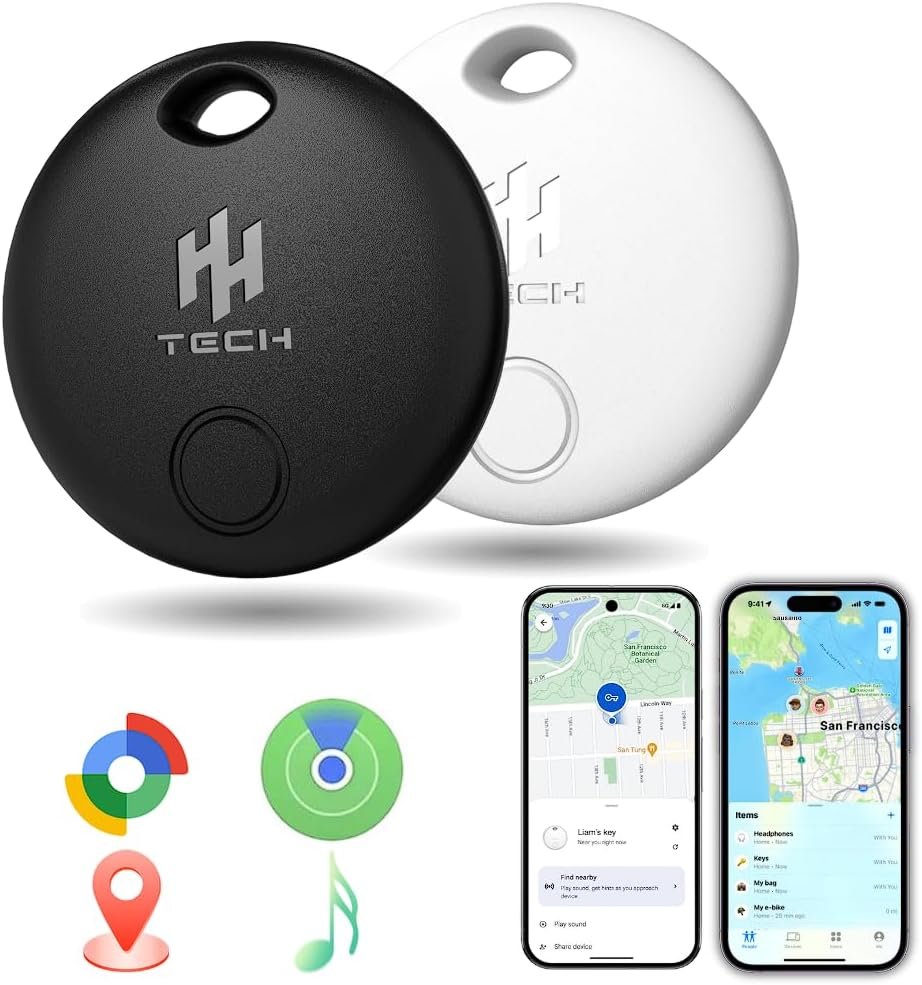
The HH-Tech Dual-System Smart Tracker Tags Pack-2 takes a slightly different approach from trackers designed for only one mobile ecosystem. According to the manufacturer’s current information, the tags are designed to work with both Apple Find My and Google Find Hub, allowing the same type of tracker to be used with compatible iOS or Android devices. Each tag can be paired with one platform at a time rather than operating on both platforms simultaneously. The manufacturer also notes that the tags are not compatible with Huawei HarmonyOS devices.
This cross-platform design can be useful in households where different people use iPhones and Android phones. It can also be relevant for someone who changes smartphones over time and wants an item tracker that is not necessarily tied permanently to one ecosystem.
The two-tag package is intended for belongings such as keys, wallets, bags, luggage, backpacks, and other personal items. The tags use Bluetooth for nearby finding and can take advantage of the corresponding Apple or Google finding network when the tracked item is outside the direct Bluetooth range. The manufacturer lists a Bluetooth range of up to approximately 50 meters, an audible alert, replaceable CR2032 batteries, and compatibility with the respective native finding services.
Understanding how these features actually work is important. A Bluetooth tracker is not the same thing as a standalone GPS tracker with its own cellular connection. Its ability to provide an updated remote location depends on the surrounding network and compatible devices detecting the tag. That distinction helps set realistic expectations when deciding where and how to use a product like this.
Key Features
Dual-platform compatibility
The most distinctive feature of the HH-Tech tags is their support for two major finding ecosystems.
The manufacturer’s product information states that the tags use dual-certified technology and can be paired with Apple Find My or Google Find Hub. However, the tag operates on one platform at a time. In other words, a user does not pair the same tag simultaneously with an iPhone and an Android phone.
For households with mixed devices, this can simplify the decision about which type of tracker to use. For example, someone using an iPhone can configure a tag through Apple’s ecosystem, while an Android user can configure a tag through Google’s system.
Compatibility still depends on the phone, operating system, and platform requirements. Product listings for this model identify support for iOS 14.5+ and Android 9+, while the manufacturer’s current product page should be checked for the latest compatibility information before setup.
Apple Find My integration
When configured for Apple’s ecosystem, the tag can be associated with the Find My service. This allows users to manage the item through the same general environment used to locate compatible Apple devices and accessories.
The advantage of this type of integration is convenience. Instead of depending on a separate proprietary tracking application, the tag is designed to work through an established device-finding platform.
The exact features available can depend on Apple’s current Find My functionality and the connected iPhone or iPad. Users should therefore consider the tag as a Find My-compatible Bluetooth tracker rather than assuming that every Apple tracking feature is available on every compatible accessory.
Google Find Hub integration
Android users can configure the tag through Google Find Hub. Google describes Find Hub as a system that can help users locate compatible tracker tags attached to physical items such as wallets, keys, and bicycles. The service can use a crowdsourced network of Android devices to help locate compatible items when they are not directly connected to the owner’s phone.
Google also explains that tracker tags can be added to Find Hub after pairing, while Android settings such as Location, Bluetooth, account access, and offline-finding configuration can affect the overall experience.
This makes the Android implementation particularly useful for people who want item tracking without installing a specialized tracker application from the tag manufacturer.
Bluetooth-based nearby finding
Bluetooth is particularly useful when an item is somewhere close.
According to HH-Tech, the tag can communicate over Bluetooth within a range of approximately 50 meters under suitable conditions. The actual distance can vary considerably depending on walls, furniture, buildings, interference, the phone, and the surrounding environment.
For example, if keys are somewhere inside a house, the tracker may be within Bluetooth range even though the keys themselves are hidden from view.
The app can be used to trigger the tag’s built-in sound. HH-Tech lists an approximately 80 dB alert for nearby finding.
This makes audible alerts particularly relevant for objects that are easy to misplace but difficult to see, such as keys underneath clothing, a wallet inside a bag, or a backpack behind furniture.
Finding items beyond direct Bluetooth range
One of the most important concepts to understand about modern item trackers is network-assisted finding.
If the tag moves outside the Bluetooth range of the owner’s phone, the tag itself does not suddenly become a cellular GPS device. Instead, compatible nearby devices participating in the relevant finding network may detect the tracker and help update its approximate location.
Google explains that Find Hub uses a crowdsourced network of Android devices and encrypted location information to help locate compatible offline devices and tracker tags.
The manufacturer’s HH-Tech information describes a similar network-based approach using Apple and Android devices for locations beyond direct Bluetooth range.
This distinction matters because network availability depends on the environment. A tag in a busy airport, shopping district, or city may encounter many compatible devices. A tag in a remote area may have fewer opportunities for location updates.
Replaceable battery
The HH-Tech Dual Smart Tag uses a replaceable coin-cell battery. The manufacturer’s current product page specifies a CR2032 battery and states that battery life can reach approximately one year under its stated usage conditions.
Replaceable batteries are useful for long-term ownership because the entire tracker does not have to be discarded simply because its battery has reached the end of its usable life.
Product information also indicates that replacement batteries and accessories are included with the package, although buyers should check the current Amazon listing to confirm the exact package contents for the particular listing they are purchasing.
Compact physical design
The listed dimensions are approximately 35 × 35 × 5 mm, with a reported weight of about 12 grams.
A compact form factor is important for an item tracker because it needs to add relatively little bulk to the object being tracked.
The package is also described as including accessories such as silicone protectors and key rings. These can make it easier to attach a tag to a set of keys, backpack, suitcase, or other belongings.
How It Can Be Used
Tracking keys around the home
Keys are one of the simplest applications for a Bluetooth tracker.
A tag can be attached to a key ring and then registered with the appropriate Apple or Google finding service. If the keys are misplaced somewhere nearby, the user can open the relevant app and activate the sound.
This is especially useful when the keys are hidden under cushions, inside a bag, behind furniture, or in another location that is difficult to identify visually.
The tracker does not prevent the keys from being misplaced, but it can reduce the time spent searching for them.
Keeping track of a wallet
A wallet can be another practical application.
Because wallets are often carried throughout the day and placed on tables, desks, counters, and restaurant surfaces, they can easily be forgotten. A compact tag can provide another layer of awareness.
The physical dimensions should still be considered. A tracker may be comfortable in a larger wallet or attached to a wallet accessory, but users who prefer extremely thin wallets may find that even a small tracker changes the wallet’s thickness.
Adding a tag to luggage
Travel is one of the situations where item trackers can become particularly useful.
A tag can be attached to checked luggage, a carry-on bag, backpack, or another travel item. If the bag becomes separated from the owner, the corresponding finding network may provide location information when compatible devices detect the tag.
Google specifically describes tracker tags as suitable for items such as luggage and other physical belongings.
However, travelers should understand that a Bluetooth tracker should not be treated as a replacement for airline baggage tracking procedures. It is an additional way of locating personal property, not a guaranteed recovery mechanism.
Monitoring a backpack or work bag
Students, commuters, freelancers, and office workers may use a tracker with a backpack or laptop bag.
The benefit is not necessarily continuous monitoring. Instead, the tag provides another way to locate the bag when it is misplaced or accidentally left behind.
For example, someone may leave a work bag in a meeting room and only realize it is missing after reaching another part of the building. If the tag is within Bluetooth range, the sound feature can make the search much easier.
Travel documents and accessories
A tracker can also be attached to a travel pouch containing items such as passports, chargers, cables, or other accessories.
This can be useful because travel involves handling several small items repeatedly. A tracker does not replace normal organization, but it can provide another method for locating the container holding those items.
Shared household belongings
The two-pack format can be useful when different objects need separate tags.
For example, one tag could be assigned to a frequently used set of keys while the second is attached to luggage or another bag. Depending on the ecosystem and current software capabilities, sharing functions may also allow trusted people to participate in locating a shared item.
Google currently supports sharing compatible tracker accessories with up to 10 people through Find Hub on Android 9 and later.
The exact sharing experience can vary between Apple and Google systems, so it is worth checking the current platform instructions before relying on shared tracking for an important item.
Who It May Be Suitable For
iPhone and Android households
The dual-system design may be particularly relevant for households where some people use iPhones while others use Android phones.
Rather than choosing a tracker solely around one manufacturer’s ecosystem, a dual-platform tag provides another option for households with mixed devices.
Frequent travelers
People who regularly travel with luggage, backpacks, camera bags, or other personal belongings may find item tracking useful as part of their travel organization system.
The tag can provide location information when network conditions allow, while its audible alert can help with nearby searches.
Students
Students often carry backpacks, keys, wallets, and other small belongings between classrooms, libraries, residences, and public transportation.
A compact tracker can be attached to one of those frequently moved items without requiring a large dedicated device.
Remote and hybrid workers
People who move between home, office, coworking spaces, cafés, and meetings may appreciate having an easy way to locate a frequently used bag or set of keys.
Families managing shared items
A tracker can also make sense for shared objects such as household keys, a shared travel bag, or another frequently moved item. Platform-supported sharing can allow more than one trusted person to participate in finding the item.
Important Things to Consider
It is not a standalone GPS tracker
This is perhaps the most important limitation to understand.
A Bluetooth tracker is different from a cellular GPS tracking device. The HH-Tech tag depends on Bluetooth communication and the Apple or Google finding ecosystem rather than maintaining an independent cellular data connection.
When the tag is nearby, the owner’s phone can communicate with it directly. When it is farther away, network-assisted finding depends on compatible devices encountering the tag.
Consequently, location updates should not be assumed to be continuous or instantaneous.
Bluetooth range is not guaranteed
The manufacturer’s stated range is approximately 50 meters, but Bluetooth performance is affected by physical surroundings. Walls, floors, vehicles, metal objects, interference, and other environmental factors can reduce the effective distance.
A 50-meter specification should therefore be treated as a reference under suitable conditions rather than a promise that a tag will always communicate at that distance.
Network density matters
Remote finding depends partly on the availability of compatible devices participating in the relevant network.
A tracker left in a busy urban area may have more opportunities to be detected than one left in an isolated location. Google explains that Find Hub uses participating Android devices to help locate compatible offline items through encrypted location reporting.
The same general principle applies to network-assisted item finding: the tracker needs an opportunity to be detected.
The tag works with one platform at a time
Although the product supports both Apple Find My and Google Find Hub, the manufacturer’s documentation specifies that an individual tag can be paired with either iOS or Android, rather than both platforms simultaneously.
This is an important consideration for people expecting one tag to appear independently in both ecosystems.
If the tag changes ownership or needs to move from one ecosystem to another, it may need to be removed from the original account and configured again according to the applicable platform’s procedures.
Huawei HarmonyOS compatibility
HH-Tech specifically states that its dual-system tracker is not compatible with Huawei HarmonyOS devices.
Anyone using a Huawei phone should verify compatibility before choosing this particular model.
Battery maintenance
Although the manufacturer states that the battery can last up to approximately one year, actual battery life depends on use and operating conditions.
A tracker is only useful if it has sufficient power to communicate.
For that reason, battery status should become part of normal maintenance. Google Find Hub can display tracker battery information for compatible accessories, with levels such as OK, Low, and Very Low.
It is sensible to replace the battery when the platform or tracker indicates that it is becoming low rather than waiting until the tag stops responding.
Privacy and responsible use
A tracker attached to your own belongings is very different from secretly placing a tracker on another person or their property.
Google’s Find Hub acceptable-use policy explicitly prohibits using the service to track people or property without appropriate knowledge and consent.
Modern tracker ecosystems also include protections intended to alert people about unknown trackers traveling with them. Google provides unknown-tracker alerts on supported Android devices and explains that these systems can help identify trackers that may be moving with someone without their knowledge.
This is an important part of using tracking technology responsibly.
A tracker is not a substitute for security
A tag can help locate a misplaced object, but it should not be considered an anti-theft system.
If a valuable item is stolen, the tracker may provide useful information if the relevant network detects it, but there is no guarantee of continuous location updates or recovery.
For expensive equipment, users should consider additional measures such as identification records, insurance, strong passwords, device security, and appropriate physical protection.
Comparison of General Tracker Categories
Single-ecosystem Bluetooth trackers
Some item trackers are designed primarily for either Apple’s or Google’s ecosystem.
These products can provide a straightforward experience when everyone in a household uses the same platform. The main consideration is ecosystem dependency.
A dual-system tracker such as the HH-Tech model approaches the problem differently by supporting both major ecosystems, although each individual tag remains associated with one platform at a time.
Multi-platform Bluetooth trackers
Another category includes trackers specifically designed to support different mobile operating systems.
The main advantage of this category is flexibility. Users do not necessarily have to replace the tracker simply because they switch from an iPhone to an Android phone or vice versa.
The important detail is how the tracker implements compatibility. Supporting two operating systems does not necessarily mean that every feature is identical on both platforms.
GPS and cellular trackers
GPS/cellular trackers represent a different category.
They can be designed for applications requiring more independent location reporting, but they typically involve additional hardware, power requirements, and connectivity considerations.
A small Bluetooth item tracker is generally more focused on everyday belongings such as keys, wallets, bags, and luggage rather than independent continuous GPS monitoring.
Smartwatches and phones
Modern smartphones and smartwatches can already help users locate certain devices and accessories.
However, a dedicated tracker can be physically attached to an object that does not have its own battery, operating system, screen, or internet connection.
This makes a tracker particularly useful for ordinary belongings that otherwise have no digital location capability.
Setting Up the HH-Tech Tags
The exact setup process can change as Apple and Google update their applications, so users should follow the current instructions shown by the relevant platform.
In general, the process involves first determining which ecosystem will be used.
For an Apple setup, the tag is configured through the Find My environment. For Android, the tag is configured through Google Find Hub.
Before setup, make sure the phone has the necessary account access, Bluetooth, and location functionality enabled. Google recommends checking account access, Location, Find Hub, and offline-finding settings when preparing Android devices for finding accessories.
Once paired, give the tag a recognizable name that identifies the object it is attached to. Names such as “House Keys,” “Travel Bag,” or “Backpack” are easier to understand than generic labels when several trackers are being managed.
It is also worth testing the sound feature immediately after setup. Confirming that the tag can communicate with the phone while the item is nearby gives users an opportunity to resolve setup problems before the tracker is actually needed.
Frequently Asked Questions
Does the HH-Tech Dual-System Smart Tracker work with both iPhone and Android?
The manufacturer states that the tag supports both Apple Find My and Google Find Hub. However, each tag operates with one platform at a time rather than being simultaneously paired with both.
Does it require a separate tracking app?
The manufacturer states that the tag can be paired through Apple Find My or Google Find Hub without requiring an additional proprietary tracking application.
The relevant Apple or Google app and account requirements still apply.
How far can the tracker work over Bluetooth?
HH-Tech lists a Bluetooth range of up to approximately 50 meters. Actual performance can be lower depending on walls, interference, the device being used, and the surrounding environment.
Can it locate an item when it is outside Bluetooth range?
Potentially. When the tag is outside the owner’s direct Bluetooth range, the Apple or Google finding network can help provide location information when compatible nearby devices detect the tag. Google describes Find Hub as using a crowdsourced network of Android devices for compatible offline finding.
However, network-assisted finding is dependent on the surrounding environment and participating devices.
Can the battery be replaced?
Yes. HH-Tech identifies the battery as a replaceable CR2032 coin cell and states that the battery can provide up to approximately one year of use under its stated conditions.
Can I use one tag with both Apple and Android phones at the same time?
The manufacturer says no. The tag can be used with either Apple Find My or Google Find Hub, but not both simultaneously.
Is it compatible with Huawei phones?
HH-Tech specifically states that the dual-system tracker is not compatible with Huawei HarmonyOS devices.
Can the tracker be used for luggage?
Yes. Luggage is one of the intended use cases described by the manufacturer, and Google also identifies luggage as an example of an item that can use compatible tracker tags.
Can a family member help locate a tagged item?
Sharing capabilities depend on the platform. Google currently allows compatible Find Hub tracker accessories to be shared with up to 10 people through supported Android functionality.
Is this a GPS tracker?
No. It is better understood as a Bluetooth item tracker that can participate in Apple or Google finding networks. It does not operate like a standalone cellular GPS tracker with its own mobile-data connection.
Can it be used to secretly track someone?
It should not be used for that purpose. Google explicitly prohibits using Find Hub to track people or property without appropriate knowledge and consent.
Conclusion
The HH-Tech Dual-System Smart Tracker Tags Pack-2 is designed around a straightforward idea: make everyday belongings easier to locate while supporting both major mobile ecosystems.
Its combination of Apple Find My and Google Find Hub compatibility gives it a different role from trackers limited to a single platform. The tags can be configured for an Apple or Android environment, provide Bluetooth-based nearby finding, include an audible alert, and can use the relevant finding network when the item is outside the owner’s direct Bluetooth range. HH-Tech also lists a replaceable CR2032 battery, compact dimensions, and accessories intended for attaching the tags to everyday belongings.
At the same time, understanding the limitations is just as important as understanding the features. The tag is not a standalone GPS device, Bluetooth range can vary, network-based location updates depend on compatible nearby devices, and one tag cannot be simultaneously paired with Apple and Android systems. Users should also keep battery condition, device compatibility, privacy, and responsible tracking practices in mind.
For people looking for a compact way to organize and locate keys, wallets, bags, luggage, and other personal belongings, the dual-platform approach provides a practical option to consider. The most important step is to choose the ecosystem that matches the phone being used and configure the tracker before the item is lost.
Leave a Reply